Guide · Manufacturing
ERP, off-the-shelf or custom software: what should a small manufacturer choose?
If your steps look like those of most plants and you are willing to adapt the way you work to the software, an existing product will do the job: an ERP such as Odoo, Genius ERP or Prextra, or production software such as MRPeasy. If the way you sell and build is what sets you apart, a custom application is almost always the better choice. Either way, keep your accounting in Sage 50, Acomba or QuickBooks, and connect the rest to it.

By François Painchaud, founder and president of KasvuPublished · Updated · Reading time: 13 minutes
In short
- Many small manufacturers have neither an ERP nor a CRM: accounting software, Excel and email. The accounting software often doubles as the customer list.
- An ERP covers everything, accounting included, but asks you to adopt its way of working. Few vendors publish the cost or the length of an implementation.
- Custom software is worth the investment when your products are configured, the proposal has to become a work order without re-entry and every order is tracked step by step.
- Accounting stays in your accounting software: the application sends it completed orders, with no one re-entering them.
- Custom software has its own risks: upfront investment, time, upkeep. A limited first version and code that you own reduce them.
- Public funding mostly covers consultant fees and packaged software. For custom software, eligibility is confirmed case by case.
What most small manufacturers actually use
In the small manufacturers we meet, the picture looks the same. Invoicing runs through accounting software: Sage 50 (formerly Simply Accounting), Acomba or QuickBooks. That same software often serves as the customer list, for lack of a CRM. Proposals are prepared in Excel or Word, changes arrive by email, and the status of each order lives on a whiteboard or in the heads of two or three people.
It works, until volume grows. An option copied wrong becomes a production error. Sales calls the plant to find out where an order stands. The same information is typed three times, from the proposal to the work order, then to the invoice. Our page on replacing Excel with an application describes the signs that a file has become the team’s system, and the one on custom quoting software, how the proposal becomes an order with no re-entry.
That was the situation at Pavar, which builds chairs and banquettes for restaurants across North America: no ERP, no CRM, accounting software, and proposals prepared in Excel with hundreds of possible choices.
The three possible paths
An ERP, or enterprise resource planning system, brings sales, purchasing, inventory, production and accounting together in a single system. Production software, also called MRP (manufacturing resource planning), is limited to planning, bills of materials and manufacturing orders, alongside your accounting. A custom application follows your own steps and connects to the accounting software you already use.
The first criterion is how you produce. A plant that builds in series or in continuous runs follows steps that off-the-shelf software knows well. A plant that builds to order, with products configured for each customer, has steps of its own: that is where standard software forces the most compromises.
| Full ERP | Production software | Custom application | |
|---|---|---|---|
| Examples | Odoo, Genius ERP, Prextra, Business Central, Acumatica | MRPeasy, Acomba’s Production Management module | An application designed for your plant |
| Your accounting | Replaced by the ERP’s own, in most cases | Kept | Kept, connected to the application |
| What you have to accept | An implementation project and a way of working set by the software | The software’s screens and logic | A project to scope carefully, with a first version before the rest |
| Who it suits | A plant with typical steps, ready to put everything in one system | Standard production that mainly needs planning | Configured products and a workflow that sets you apart |
The main software, compared
Here is what the vendors publish themselves, read on their sites on October 12, 2026, and our view of the kind of business each one suits. Prices are in Canadian dollars, per user per month, unless stated otherwise. They change often: check them before you decide.
| Software | Published price | Implementation | A good choice if |
|---|---|---|---|
| Odoo (Belgium) | $44 to $91.90 depending on plan and billing; onboarding packs from $850 (4 hours) to $36,500 (200 hours) | By Odoo or a partner; no published timeline | You want a modular ERP available in French and accept an integrator to configure it. Shop-floor tracking requires a paid plan. |
| Genius ERP (Quebec) | No published price | By the vendor’s own team; no published timeline | You build to order or in batches and want a Quebec ERP designed for the plant, accounting included. |
| Prextra (Quebec) | No published price | By the vendor; no published timeline | You want a Quebec ERP that also covers distribution or services, with its own accounting. |
| Business Central (Microsoft) | $149.20 for the Premium plan, which includes manufacturing (billed yearly) | Through a Microsoft partner | You already work with a Microsoft partner and want an ERP available in Canadian French. |
| Acumatica (United States, office in Montreal) | APEX package starting under US$2,185 per month, implementation included | By Acumatica or a partner | Many people need access to the system: the price does not depend on the number of users. |
| MRPeasy (Estonia) | $49 to $149 (currency not stated) | Self-service; training at $150 an hour | Your production is standard, you are keeping QuickBooks Online and support in English suits you. |
If you already use Acomba, two options plug into it: ServiCentre ERP 360, which offers a Manufacturing package, and Acomba’s Production Management module, listed at $55 a month, which handles manufacturing recipes. Other Quebec vendors are worth a look, for example SEIGMA, integrated management software for small businesses, and DCi Software, in Vaudreuil-Dorion, for manufacturing management. Neither publishes prices.
The real cost of an ERP: changing the way you work
An ERP is built around a standard way of selling, buying and manufacturing. Implementing one means configuring it, moving in your customers, products and bills of materials, training the team, and above all adapting your methods to its own. That last part is the one most often underestimated.
A manufacturer we are meeting with right now has just implemented an ERP. The team is seeing the effort it takes: understanding the software, then adjusting their way of working so it fits. The software is not at fault. It is the normal price of a tool built for the average business.
Another point to plan for: most ERPs replace your accounting. Genius ERP and Prextra, for example, have their own accounting module. Leaving Sage 50, Acomba or QuickBooks also affects your accountant and your month-end habits.
For a plant with typical steps that wants a single system and accepts adapting to it, an ERP remains a good choice. We will tell you if that is your case.
When custom software is the better choice
- Your products are configured: models, dimensions, fabrics, finishes, hardware, and every choice changes what the plant builds.
- The proposal has to become a work order without anyone retyping the information.
- Your customers take part: they approve the proposal, then specify their choices online.
- You track every order step by step, and sales needs to know where it stands without calling the plant.
- The way you sell or build sets you apart, and you want a tool that strengthens it rather than standardizing it.
Off-the-shelf software does well what all businesses have in common, and less well what is specific to you. If you want to build on your advantage and create a tool unique to your field, custom software is almost always the better option. With one exception: accounting. It has nothing to gain from being reinvented, and your accounting software already does it well.
Pros and cons of each option
No option is risk-free. Here are the risks we see, including those of custom software, and how to reduce them.
| ERP or off-the-shelf software | Custom application | |
|---|---|---|
| Pros | Features proven by thousands of businesses, lower upfront cost, updates handled by the vendor | Your exact rules and steps, changes made on your priorities, no per-user licence |
| Cons | Your way of working adapts to the software, monthly licences, costly customization, vendor decisions on pricing and the product’s future | Higher upfront investment, time before the first version, upkeep and security to plan for over time |
| To reduce the risk | Have one of your real orders processed in the demo, and get the cost and length of the implementation in writing | Start with a limited first version, require the code, the data and the documentation, and plan hosting and support with or without the developer |
The model we build, step by step
Our approach fits in one sentence: keep your accounting software and build the rest around the way you work. Information is entered once, at the start, then follows the order all the way to the invoice.
- Customer
A light CRM brings together your customers, their contacts and their order history. It takes over that role from the accounting software.
- Proposal
Your products and their options are already in the application: the team prepares the proposal from that base.
- Approval
The customer opens the proposal through a link, asks for a change or accepts it.
- Work order
The customer specifies their choices on it, such as the stain, the fabric or the nailheads, then approves it in turn.
- Production
The order enters the plant. Each step, from machining to shipping, is tracked by the team.
- Accounting
The completed order goes to Sage 50, Acomba or QuickBooks through an export or a connection, with no re-entry.
That is the path of the application we built for Pavar, in use for several years. Here are three of its screens, recreated with demonstration data.
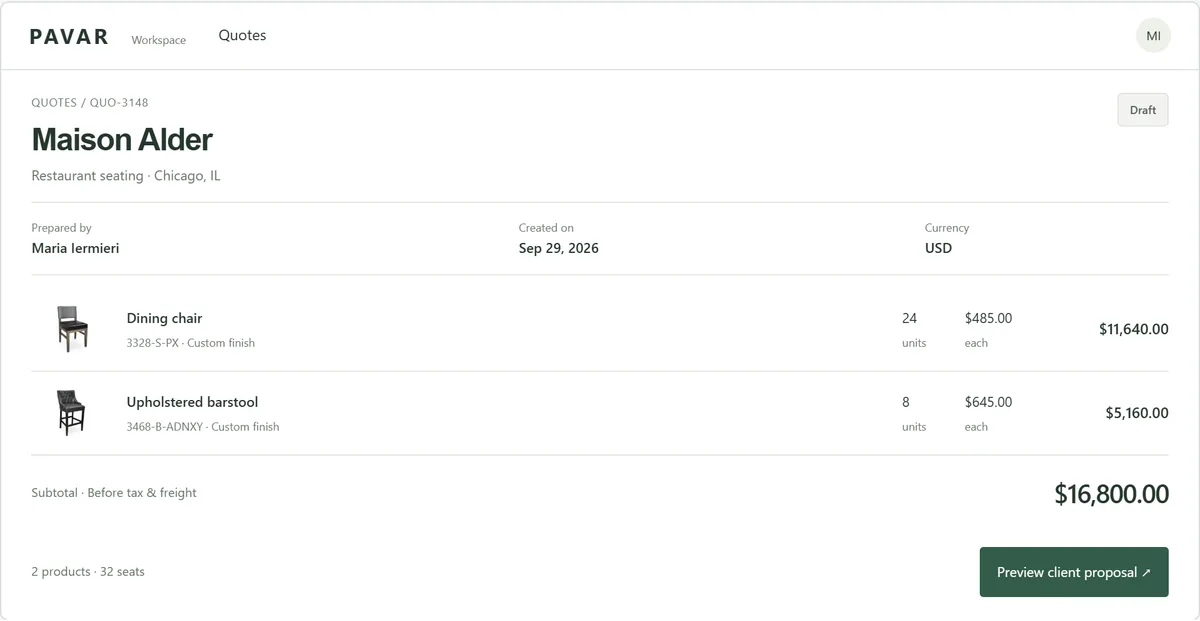
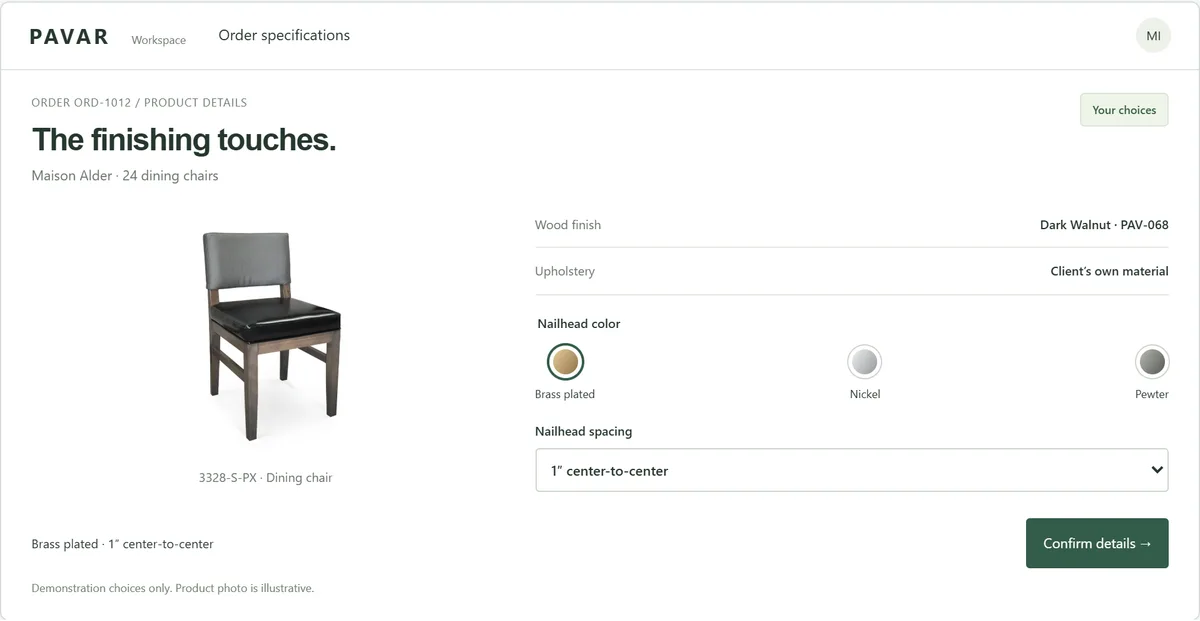
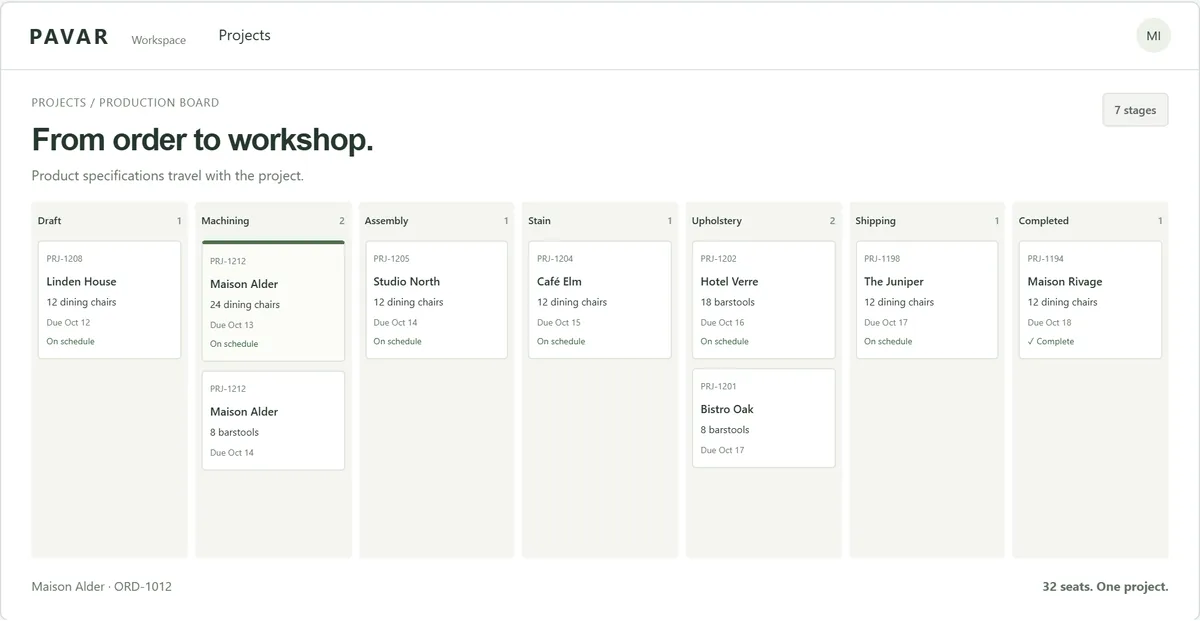
A proposal that took hours of work in Excel is now prepared in minutes. That is an order of magnitude, not a timed measurement. Maria Iermieri, Vice-President of Sales and Marketing and co-owner, sums it up: “Preparing a proposal used to mean working in Excel. Now our products, the client’s choices and the details of their order all live in the application. We save time, and we move forward with far less risk of error.” In our projects, the code and the data belong to the client.
How to decide: six questions
| Question | If yes | If no |
|---|---|---|
| Do you build to order, with products configured for each customer? | Custom, or an ERP specialized in that way of producing | Off-the-shelf software |
| Do your steps look like those of most plants? | Off-the-shelf software | Custom |
| Are you ready to change the way you work to follow the software? | Off-the-shelf software | Custom |
| Do your products have many options that change how they are built? | Custom, or an ERP with a configurator | Off-the-shelf software |
| Do your customers need to approve or specify their choices online? | Custom | Off-the-shelf software |
| Do you want to keep Sage 50, Acomba or QuickBooks? | Production software or custom | Full ERP |
The answers rarely all point the same way. Start with the step that costs you the most time or errors: that is the one that should drive the choice. For criteria that apply beyond the plant, see our guide custom or off-the-shelf software.
The features to check, whichever path you take
ERP, production software or custom application: these features come up in almost every plant. Check which ones you need, and how each option handles them.
- Products and bills of materials: your models, their options, the materials and the manufacturing steps of each.
- Planning: the order of jobs on the floor, based on promised dates and real capacity.
- Production tracking: the step each order is at, visible to sales and to the plant alike.
- Traceability: lots and serial numbers, if your customers or your industry require them.
- Cost of goods: what an order actually cost in materials and labour.
- Links with your tools: accounting (Sage 50, Acomba, QuickBooks), design (SolidWorks, Inventor) and, for large customers, electronic data interchange (EDI).
- Your data: the ability to get it back complete, in a common format, the day you change tools.
How much does a custom application for a plant cost?
The price depends on the number of screens, the rules to program and the integrations with your tools. It is set per project, in the proposal, before work begins. A first working version is ready in about eight weeks: we start with the step that wastes the most time, then add the others. Our guide on the cost of a custom application details what drives the price.
Compare over several years. An ERP is paid per user, every month, plus implementation. A custom application is paid mostly up front, then in hosting, support and improvements. The right calculation depends on how many people will use the tool and how much your own steps matter.
Government funding: what actually applies
Investissement Québec’s ESSOR program funds the diagnosis and the digital plan (component 1B, up to 50% and $20,000) and then carrying it out (component 1C, up to 50% and $50,000), as a non-repayable contribution. It targets businesses with 250 employees or fewer and revenue of at least $2.5 million. The eligible expenses listed are mainly fees for outside consultants, and the program ends on March 31, 2027.
Quebec’s investment and innovation tax credit (C3i) covers the purchase of an eligible “management software package”: 15% in Montreal and Quebec City, up to 25% in some regions, for expenses incurred before January 1, 2030. The text targets a software package: for custom-built software, have your tax advisor confirm eligibility. Canada Economic Development for Quebec Regions also offers an interest-free repayable contribution, generally up to 50%, for adopting systems such as an ERP. When training the team stems from a new technology, Services Québec’s MFOR program can cover up to 65% of it.
Some vendors state that Investissement Québec can cover up to 40% of implementation costs, and firms that specialize in grants put these applications together. The rules change often: have your project confirmed before counting on any funding. Our guide to digital transformation grants covers the programs currently available.
Sources
- Odoo, pricing (in French) · consulted October 12, 2026
- Odoo, Community and Enterprise editions (in French) · consulted October 12, 2026
- Odoo, onboarding packs (in French) · consulted October 12, 2026
- Genius ERP, home page: target customers (in French) · consulted October 12, 2026
- Genius ERP, pricing (in French) · consulted October 12, 2026
- Genius ERP, integrated accounting (in French) · consulted October 12, 2026
- Prextra, industries (in French) · consulted October 12, 2026
- Prextra, finance and accounting (in French) · consulted October 12, 2026
- Prextra, Contact page: funding FAQ (in French) · consulted October 12, 2026
- Microsoft, Dynamics 365 Business Central pricing (Canada) · consulted October 12, 2026
- Microsoft, Business Central languages and localizations · consulted October 12, 2026
- Acumatica, pricing (unlimited users) · consulted October 12, 2026
- Acumatica, APEX for Manufacturing · consulted October 12, 2026
- MRPeasy, pricing and features by plan · consulted October 12, 2026
- MRPeasy, supported languages · consulted October 12, 2026
- Acomba, ServiCentre ERP 360 (in French) · consulted October 12, 2026
- SEIGMA, integrated management software for small businesses (in French) · consulted October 12, 2026
- DCi Software, manufacturing management (in French) · consulted October 12, 2026
- Acomba, Production Management module (in French) · consulted October 12, 2026
- Investissement Québec, ESSOR program, components 1B and 1C (in French) · consulted October 12, 2026
- Revenu Québec, investment and innovation tax credit (C3i) (in French) · consulted October 12, 2026
- Finances Québec, C3i tax credit rates (in French) · consulted October 12, 2026
- Canada Economic Development for Quebec Regions, Business Scale-up and Productivity · consulted October 12, 2026
- Services Québec, workforce training measure (MFOR), business component (in French) · consulted October 12, 2026
The author
François PainchaudFrançois Painchaud founded Kasvu, based in Montreal, which builds custom applications and advertising campaigns for small businesses in Quebec and the rest of Canada. For ten years he has worked with Pavar, a furniture manufacturer, from proposal to production.
Our applications for manufacturers